Thu, 14 Feb 2008
Keymodules
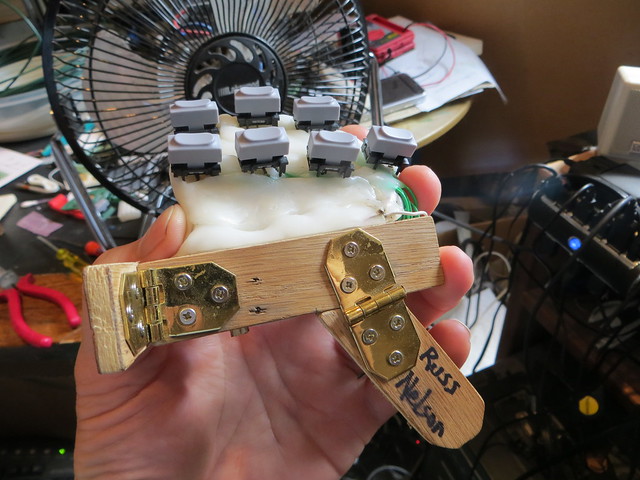
Working on the Mark XIII keyboard. This one will have the keymodules
connected together with a matrix of stiff-ish copper wires, covered over
in polycapralone. The theory is that people will be able to change the shape
of their keyboard by heating it up using a hot air blow dryer. That will
soften the polycapralone, which gets quite soft, and won't hold up its
own weight, hence the copper wires. The keyboard owner can push the
keymodules around until they're in the perfect position for them. The
copper wires will hold the shape until the polycapralone hardens, making
the keyboard both flexible and stiff, soft and hard, as needed.
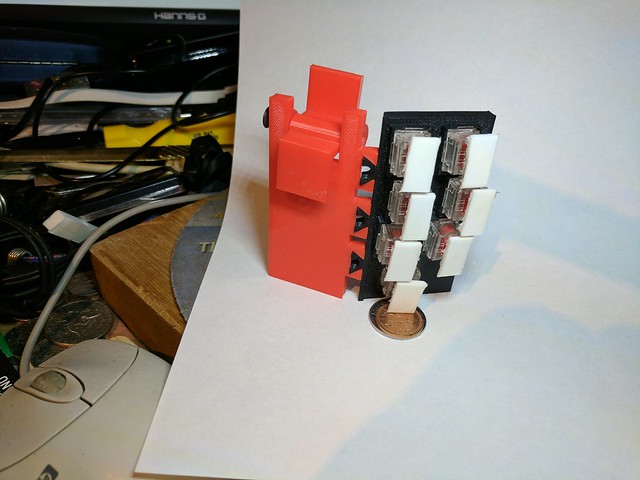
Here are a set of keymodules, soldered to a small PC board, with a
brass strip used as a barrier against the polycapralone. Without the barrier,
the polycapralone would stick to the keys and/or jam up the key movement.
Posted [02:28] [Filed in:
chordite]
[
permalink]
[
Google for the title] [Tags
chordite ] [
digg this]
Mon, 07 Jan 2008
Myoelectric chordite?
Stuart writes to ask if you couldn't put a strap around the wrist
to sense the movement of the tendons through the wrist, by way of
making a keyless chordite.
I think that would be dangerous. The tendons run inside little
tunnels past the carpal bones (hence the name carpal tunnels -- oh
these doctors can be SO creative sometimes). Squish the tunnels and
you can inflame them. If they get inflamed they can swell up which
keeps them inflamed, etc etc etc. Bad news.
No, better to go looking in the muscles further up the arm for myoelectric
signals.
But note that it can be more fatiguing to be moving your fingers in
mid-air than to be pressing them against something. The Chordite is
designed to put the keyswitches at the finger's neutral point, so that
relaxation puts your fingers on the keyswitches. It then takes only a
little bit of pressure and movement to press the key, but because the
key has hysteresis, you can feel it when you have pressed the key.
Posted [23:52] [Filed in:
chordite]
[
permalink]
[
Google for the title] [
digg this]
Mon, 05 Nov 2007
Status report
Status report on the free chordites over in my '770' category. Readers of the main blog
may be confused, but pyblosxom allows me to create multiple rss feeds. The
770 category gets syndicated on Planet Maemo. But if you only ever look in the Chordite category, you won't see it.
Posted [16:38] [Filed in:
chordite]
[
permalink]
[
Google for the title] [Tags
bluetooth,
chording,
keyboard,
chordite ] [
digg this]
Tue, 30 Oct 2007
Keycoding system
Several people have asked me what coding system is used for the
Chordite. There is no standard chording system for chording
keyboards, because they're all different. Some use two hands for
chording. For example, Douglas Englebart's Augment used a chord
keyboard and mouse combination. Hold a combination of buttons on the
chord keyboard (five switches, one for each finger) and press one,
two, or three mouse buttons. Or for example, the Twiddler
uses a large set of buttons, three for each finger. Or I saw a fellow
at a Linux World Expo who had a wrist-mounted keyboard that had four
buttons under each fingertip and three under the thumb.
The Chordite has at least two possible codings. The one proposed
by the inventor, John McKown,
involves pressing buttons until you've gotten the correct combination
of buttons, then releasing at least one button to generate that key.
Another one is to use only combinations of two buttons, let's say A
and B. The two of them generate four keys by changing the order in
which you press and release A and B. I haven't (yet) experimented
with both to see which works better.
Posted [15:23] [Filed in:
chordite]
[
permalink]
[
Google for the title] [Tags
bluetooth,
chording,
keyboard ] [
digg this]
Thu, 06 Sep 2007
Chordite vs. Twiddler
Johan Helsingius suggests that I compare the Chordite and the Twiddler. There are two possible comparisons:
between concepts and between implementations. So, the concept first.
The Twiddler uses several three keys for each finger, and two keys for
your thumb. Various combinations of these keys generate keystrokes. The
Chordite uses the thumb to hold the keyboard. Since the Chordite keys
are pressed by the knuckles rather than fingertip, each finger may press one or two keys.
In both systems, each finger can generate two bits of information.
Twiddler can press Left, Middle, Right, or no key. Chordite can press
Distal, Medial, Distal and Medial, or no keys. However, the Twiddler
includes two buttons for the thumb, so that makes the chordspace four
times as large. The Chordite makes up for that by providing for sticky
shift, control, and alt prefixes.
The implementations differ because the Twiddler 2 is a USB keyboard,
and my Chordite is bluetooth. Since the Twiddler 3 will be bluetooth,
there's no obvious benefit to the Chordite.
Posted [16:31] [Filed in:
chordite]
[
permalink]
[
Google for the title] [
digg this]
Sun, 02 Sep 2007
Chordite versus CyKey
MJ Ray suggested that I explain how the Chordite differs or is
similar to the CyKey. Well enough! Under "similar" I would put:
chording, unfamiliar, pocketable, one handed, wireless, battery
operated. Under "different", I would say that the CyKey must be used
against a surface whereas the Chordite can be used in mid-air. The
CyKey works well for either hand, whereas the Chordite is handed. The
CyKey uses infrared, which restricts the positioning of the device,
and which restricts the devices that may be used, whereas the Chordite
uses Bluetooth, which is widely supported and doesn't require any
special positioning. The CyKey's infrared is cheaper than bluetooth
if you already have infrared, but is more expensive if you lack it.
With the CyKey, you type with your fingertips, whereas with the
Chordite, you type with your knuckles. With the CyKey your thumb
moves from one key to another, whereas with the Chordite, your thumb
holds the keyboard and the other fingers simply move up and down; no
hunting for keys. Finally, the CyKey is an off-the-shelf product
whereas a Chordite (currently) must be custom ordered to fit your hand.
Posted [18:56] [Filed in:
chordite]
[
permalink]
[
Google for the title] [Tags
chordite,
cykey,
bluetooth,
chording,
keyboard ] [
digg this]
Sat, 01 Sep 2007
Mark XII keyboard
This keyboard is finally salable. It has worthy
electronics which will give you a nice long battery life. It's
sturdy. It's replicable on a reasonable basis. Right now I'm still
building it on a custom basis, but I have some ideas for how to fit
people with different size hands.
Unfortunately, I haven't been able to get past the custom firmware
hurdle. I'm using a driver on the Linux side which pulls in seven
different keys and implements the chording algorithm. It works well
enough, but it's restrictive to need a driver. Can't sell into the
Windows or Mac market without modified firmware. Blue Packet has
offered to modify the firmware for a stiff price. Unfortunately, that
requires a larger committment than I can put forth given my current
lack of understanding about how to fit multiple people.
Plus, not only is the fit a problem, but everybody
(everybody, everybody) thinks it's hard to learn how to
use. It isn't, because the most common keystrokes are also the
easiest ones to make. Given the cheatsheet, you can type your name
within five minutes. It's really not that hard, but it's so
unfamiliar to people that it looks hard.
Here's the front of the keyboard, folded for pocketing. Notice
the classy 1/4" plywood and ground-off wood screws. This is for
strength. Relative to the stresses on the keyboard, the 1/4" plywood
is quite strong, and the hinges ensure that the wood meets up with a
hard stop at the limit of its extension.
With the keyboard unfolded for use, you can see the whole wood and
brass steampunk thing going on here. The previous keyboard fell apart
in several ways. This one won't, not even if you throw it into a soft
suitcase and take it on an international trip.
You can see how the upper piece of wood hangs off the knuckle of your first finger, and how your thumb rests on the top of the AAA battery box. The piece of wood at the bottom rests against the base of your palm, and provides one end of the lever that allows your finger knuckles to reliably press against the keys.
Here's how you grip the keyboard. The thumb only holds the keyboard. You press the keys with the knuckles of your four fingers.
Here's how it looks from the edge, or top, of your grip.
Posted [12:27] [Filed in:
chordite]
[
permalink]
[
Google for the title] [Tags
bluetooth,
chording,
keyboard ] [
digg this]
Thu, 26 Apr 2007
Mark XII Electronics, part 2
Thanks to advice from Mitch Sun of Blue
Packet, I fixed the problem with the Mark XII electronics! I didn't
realize that a pull-down on a diagnostic serial input was required.
Soldered an additional 10K resistor onto the board, and it's working fine.
"hcitool scan" prints this:
00:12:A1:61:0E:21 BluePacket Bluetooth Wireless Keyboard
Now to design a PC board appropriate for the product!
Posted [01:28] [Filed in:
chordite]
[
permalink]
[
Google for the title] [
digg this]
Fri, 30 Mar 2007
Mark XII Electronics
The Mark XII keyboard is as yet unbuilt. I'm happy enough with the
Mark XI
physical design. With a little bit more work, it's manufacturable,
except for the electronics. For that, I need something which consumes
less power, is smaller, can implement chording, and implements the HID
profile. That perfectly describes the Broadcom BCM2042 bluetooth
keyboard controller.
Unfortunately, that chip is a BGA chip, which is hard to work with.
Fortunately, several companies implement Broadcom's 92042 bluetooth
keyboard module. Blue
Packet is one of them. They sell the 2042 on their
BP20422 bluetooth keyboard module (to which I can't link directly,
but it's off the drop box.) They haven't (yet) committed to modifying
8051 firmware with the necessary chording algorithm, but I'm confident
that I can talk them into it. Talk, yes, and money. Unfortunately,
the module on the PC board isn't working. I suspect that I toasted it
while soldering it to the PC board.
Speaking of the PC board, my friend DJ Delorie very graciously answered
my questions about how to use PCB, the Open Source PCB package. Then, he
even volunteered to make the board for me. Ahhh, it's to nice to have
college buddies. They make your life so much easier. This first cut
at a board is just a footprint adapter. I wanted something from which
to hang discretes, as well as have good access to the pins. Plus,
Blue Packet hadn't yet sent me the schematics.
I have ordered another ten modules from Blue Packet. That should
be enough to get a good prototype working, even without the chording
firmware. I'll only be able to type 7 keys without chording,
but I'll have all the electronics in order at that point.
Posted [17:50] [Filed in:
chordite]
[
permalink]
[
Google for the title] [Tags
bluetooth,
chording,
keyboard ] [
digg this]
Mark XI keyboard
Been sitting on this version of the keyboard, but I want to get it
out there. This one is much smaller and stealthier. It also puts the
keys on a flexible PC board. That's much more manufacturable than the
previous versions which used the key's mounting straps. The keys flex
a little along with the PC board, but that's not a big problem.
Because the keyboard is cupped, that gives it much more strength than
if it were flat. And the pressure from the fingers is always directed
against the direction of the cupping, so physics is my friend here.
This version is just the flexible PC board, mounted in a chunk of
shapelock. It doesn't pocket as well as the Mark X
keyboard, whose thumb rest folded. But, it's sturdier, lighter and
fits well in my hand. The back view shows how the big ugly
electronics (hopefully the Mark XII
electronics will be smaller), the palm support, and the way the
thumb rests on the battery box. You can see the PC board just a bit
here. In the back of the hand view, not much shows beyond the
fingers.
Posted [17:34] [Filed in:
chordite]
[
permalink]
[
Google for the title] [
digg this]